

@super-calendar/native— the React Native renderer (Reanimated 4, Gesture Handler, Legend List). This is what most of these docs cover.@super-calendar/dom— a pure react-dom renderer with no React Native runtime, for web-only or web-first apps. See the react-dom renderer guide.@super-calendar/core— the platform-free logic, types, and hooks both renderers share. See Headless usage.
MonthList, useDateRange) is in turn inspired by
flash-calendar; reach for that
if you want a standalone, headless picker rather than a full calendar.
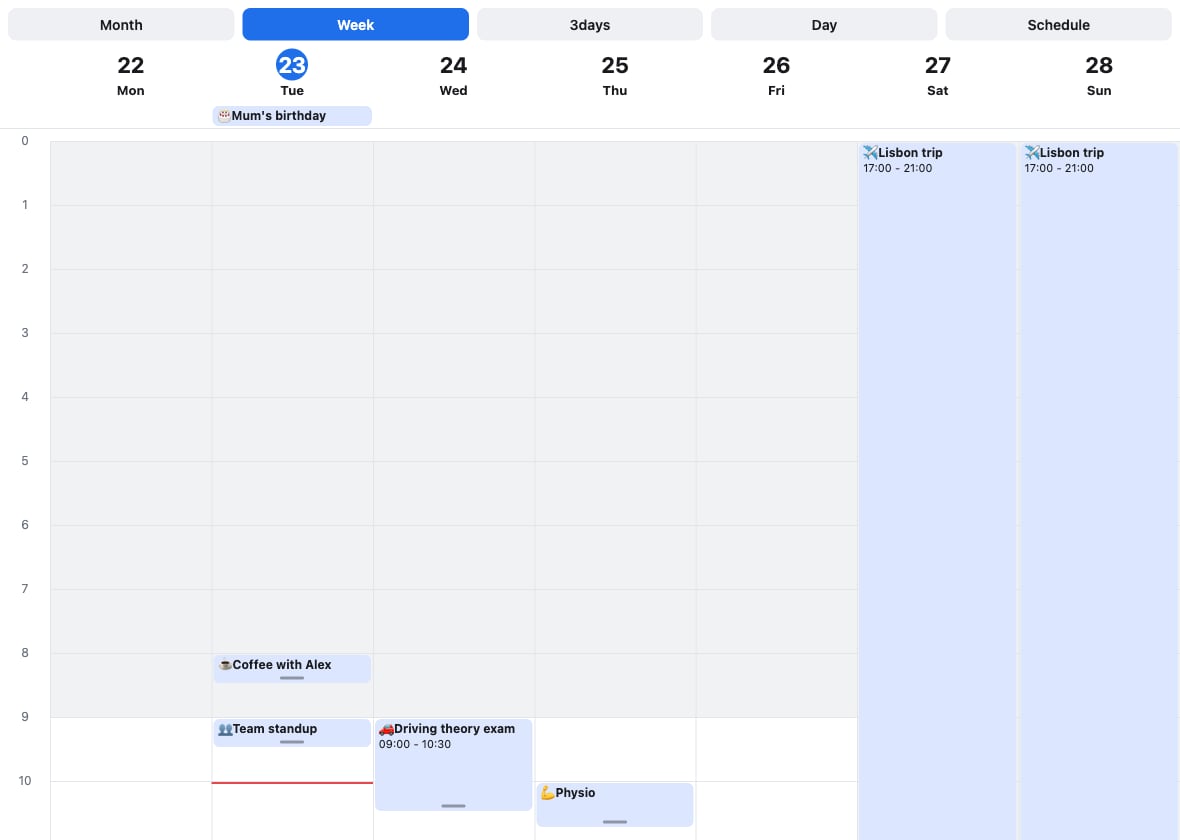
The week view: events, business-hours shading, and the current-time line.
Quickstart
Install it and render your first calendar in a couple of minutes.
Live demo
Try the web build — drag, resize, zoom, and create events in the browser.
Dragging & creating
Move, resize, reschedule across days, and sweep out new events.
API reference
Every
<Calendar> prop and exported helper.react-dom renderer
Run in the browser with no React Native runtime.
Highlights
- Five views — month, week, day, 3-day (or any N), and a schedule list.
- Virtualized & paged — every view snap-pages and only mounts a few dates at a time, so far-future and far-past dates stay cheap.
- Gesture-driven — pinch-to-zoom the time grid, long-press to drag events, drag a grip to resize, and drag empty space to create.
- Drag across days, with optional validation to reject a drop.
- Date selection (single, multiple, or range with the
useDateRangehook), disabled days, and a scrollingMonthList. - Recurring events, time-zone display, and a dark theme preset.
- Bring-your-own event type (
CalendarEvent<T>) and arenderEventescape hatch that works across every mode and event shape. - Runs on the web two ways: a pure react-dom renderer
(
@super-calendar/dom), or the React Native package on react-native-web with the touch gestures remapped to mouse and keyboard.
At a glance
Legend: ✅ supported · ⚠️ partial or with known issues · ❌ not available.