> ## Documentation Index
> Fetch the complete documentation index at: https://super-calendar.afonsojramos.me/llms.txt
> Use this file to discover all available pages before exploring further.
# super-calendar
> A gesture-driven, virtualized calendar for React Native and the web.
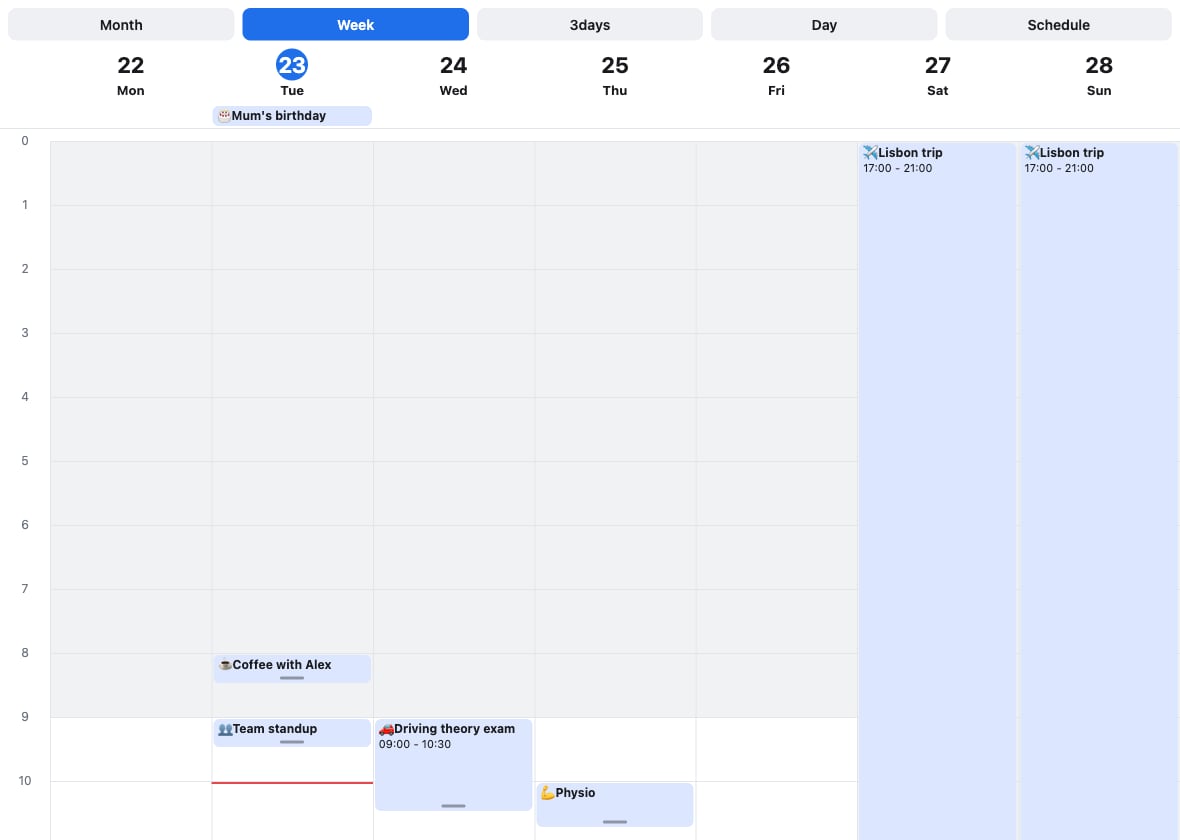
A calendar for React Native and the web, built on a render-agnostic core. It
renders month, week, day, 3-day, and schedule views, virtualizes and snap-pages
every view, and leans into touch: pinch-to-zoom, drag to move and resize, and
drag to create.
It ships as three packages:
* **`@super-calendar/native`** — the React Native renderer (Reanimated 4, Gesture
Handler, Legend List). This is what most of these docs cover.
* **`@super-calendar/dom`** — a pure react-dom renderer with no React Native
runtime, for web-only or web-first apps. See the
[react-dom renderer](/guides/dom) guide.
* **`@super-calendar/core`** — the platform-free logic, types, and hooks both
renderers share. See [Headless usage](/guides/headless).
It's an homage to
[react-native-big-calendar](https://github.com/acroca/react-native-big-calendar),
not a fork — the API differs and the internals are new. The date-picker surface
(`MonthList`, `useDateRange`) is in turn inspired by
[flash-calendar](https://github.com/MarceloPrado/flash-calendar); reach for that
if you want a standalone, headless picker rather than a full calendar.
 Install it and render your first calendar in a couple of minutes.
Try the web build — drag, resize, zoom, and create events in the browser.
Move, resize, reschedule across days, and sweep out new events.
Every `` prop and exported helper.
Run in the browser with no React Native runtime.
## Highlights
* **Five views** — month, week, day, 3-day (or any N), and a schedule list.
* **Virtualized & paged** — every view snap-pages and only mounts a few dates at
a time, so far-future and far-past dates stay cheap.
* **Gesture-driven** — pinch-to-zoom the time grid, long-press to drag events,
drag a grip to resize, and drag empty space to create.
* **Drag across days**, with optional validation to reject a drop.
* **Date selection** (single, multiple, or range with the `useDateRange` hook),
disabled days, and a scrolling `MonthList`.
* **Recurring events**, **time-zone display**, and a **dark theme** preset.
* **Bring-your-own event type** (`CalendarEvent`) and a `renderEvent` escape
hatch that works across every mode and event shape.
* **Runs on the web** two ways: a pure react-dom renderer
(`@super-calendar/dom`), or the React Native package on react-native-web with
the touch gestures remapped to mouse and keyboard.
## At a glance
| Capability | @super-calendar/native | react-native-big-calendar |
| -------------------------------------------- | ------------------------------------------ | ----------------------------- |
| Month / week / day / 3-day / custom / agenda | ✅ | ✅ |
| Generic event typing (`CalendarEvent`) | ✅ | ✅ |
| Virtualized, snap-paged views | ✅ | ❌ renders all dates |
| Pinch-to-zoom (native) / Ctrl-scroll (web) | ✅ | ❌ |
| Drag to move, resize & create | ✅ | ❌ (declined upstream) |
| Date selection (single / range / multiple) | ✅ `useDateRange` + disabled days | ❌ |
| Overlapping events | ✅ side-by-side columns | ⚠️ stacked / indented |
| Recurring events | ✅ `expandRecurringEvents` | ❌ expand them yourself |
| Time-zone display | ✅ `eventsInTimeZone` | ❌ |
| Dark mode | ✅ `darkTheme` preset | ❌ bring your own palette |
| Web | ✅ arrow-key paging, Ctrl-scroll zoom | ⚠️ partial |
| Runtime dependencies | Reanimated + Gesture Handler + Legend List | dayjs + calendarize (lighter) |
Legend: ✅ supported · ⚠️ partial or with known issues · ❌ not available.
Install it and render your first calendar in a couple of minutes.
Try the web build — drag, resize, zoom, and create events in the browser.
Move, resize, reschedule across days, and sweep out new events.
Every `` prop and exported helper.
Run in the browser with no React Native runtime.
## Highlights
* **Five views** — month, week, day, 3-day (or any N), and a schedule list.
* **Virtualized & paged** — every view snap-pages and only mounts a few dates at
a time, so far-future and far-past dates stay cheap.
* **Gesture-driven** — pinch-to-zoom the time grid, long-press to drag events,
drag a grip to resize, and drag empty space to create.
* **Drag across days**, with optional validation to reject a drop.
* **Date selection** (single, multiple, or range with the `useDateRange` hook),
disabled days, and a scrolling `MonthList`.
* **Recurring events**, **time-zone display**, and a **dark theme** preset.
* **Bring-your-own event type** (`CalendarEvent`) and a `renderEvent` escape
hatch that works across every mode and event shape.
* **Runs on the web** two ways: a pure react-dom renderer
(`@super-calendar/dom`), or the React Native package on react-native-web with
the touch gestures remapped to mouse and keyboard.
## At a glance
| Capability | @super-calendar/native | react-native-big-calendar |
| -------------------------------------------- | ------------------------------------------ | ----------------------------- |
| Month / week / day / 3-day / custom / agenda | ✅ | ✅ |
| Generic event typing (`CalendarEvent`) | ✅ | ✅ |
| Virtualized, snap-paged views | ✅ | ❌ renders all dates |
| Pinch-to-zoom (native) / Ctrl-scroll (web) | ✅ | ❌ |
| Drag to move, resize & create | ✅ | ❌ (declined upstream) |
| Date selection (single / range / multiple) | ✅ `useDateRange` + disabled days | ❌ |
| Overlapping events | ✅ side-by-side columns | ⚠️ stacked / indented |
| Recurring events | ✅ `expandRecurringEvents` | ❌ expand them yourself |
| Time-zone display | ✅ `eventsInTimeZone` | ❌ |
| Dark mode | ✅ `darkTheme` preset | ❌ bring your own palette |
| Web | ✅ arrow-key paging, Ctrl-scroll zoom | ⚠️ partial |
| Runtime dependencies | Reanimated + Gesture Handler + Legend List | dayjs + calendarize (lighter) |
Legend: ✅ supported · ⚠️ partial or with known issues · ❌ not available.